AQU-SUN

Connected Aquarium Management & Lighting Control

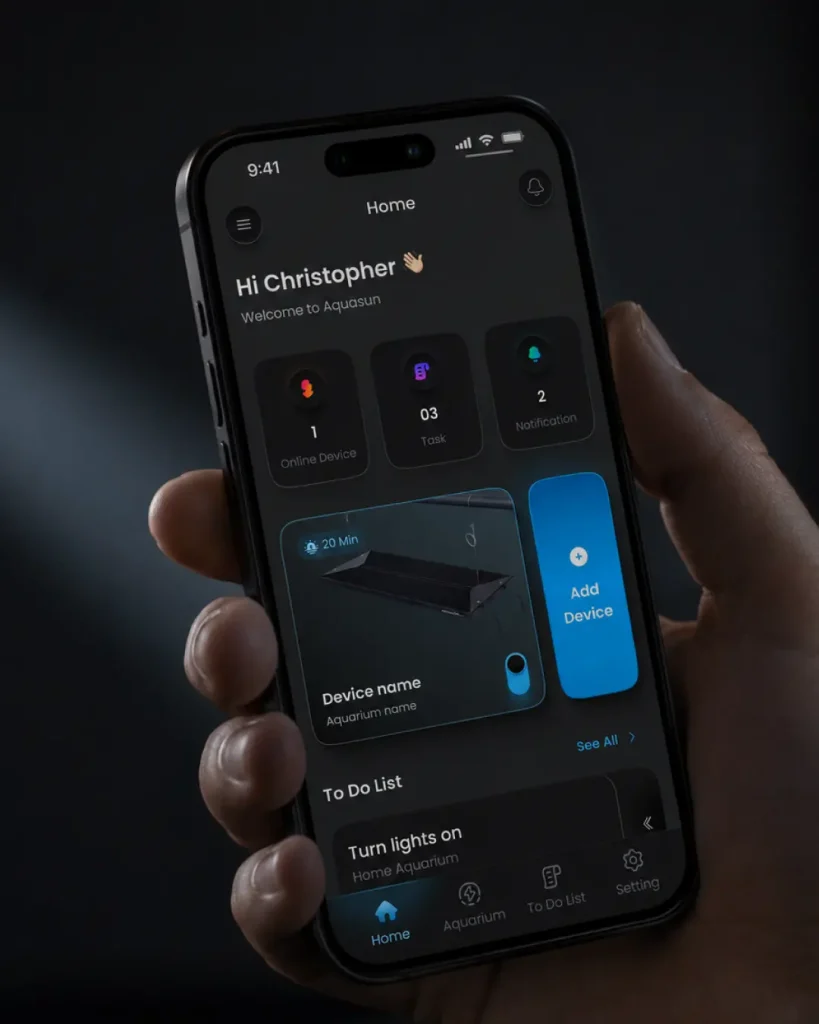
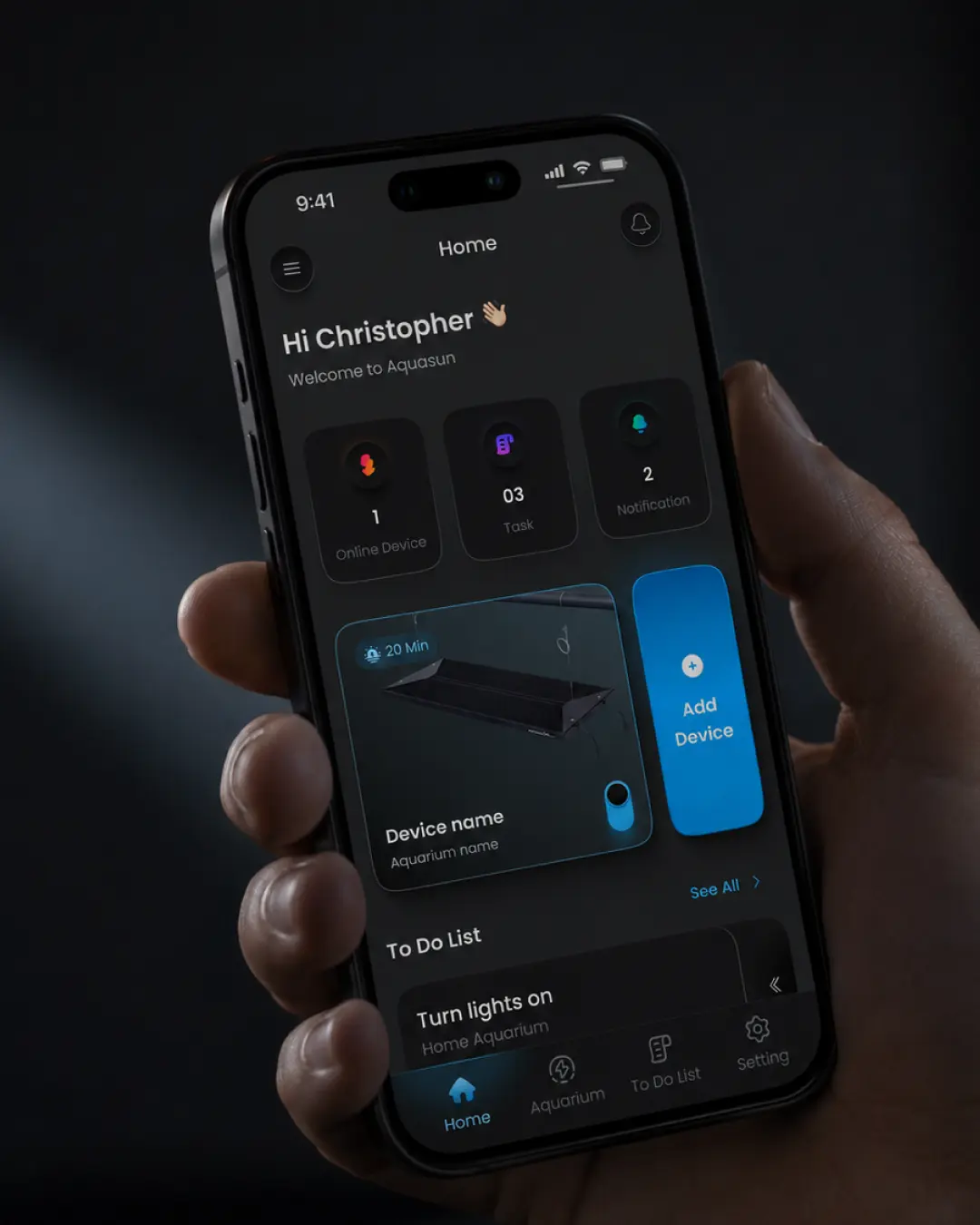
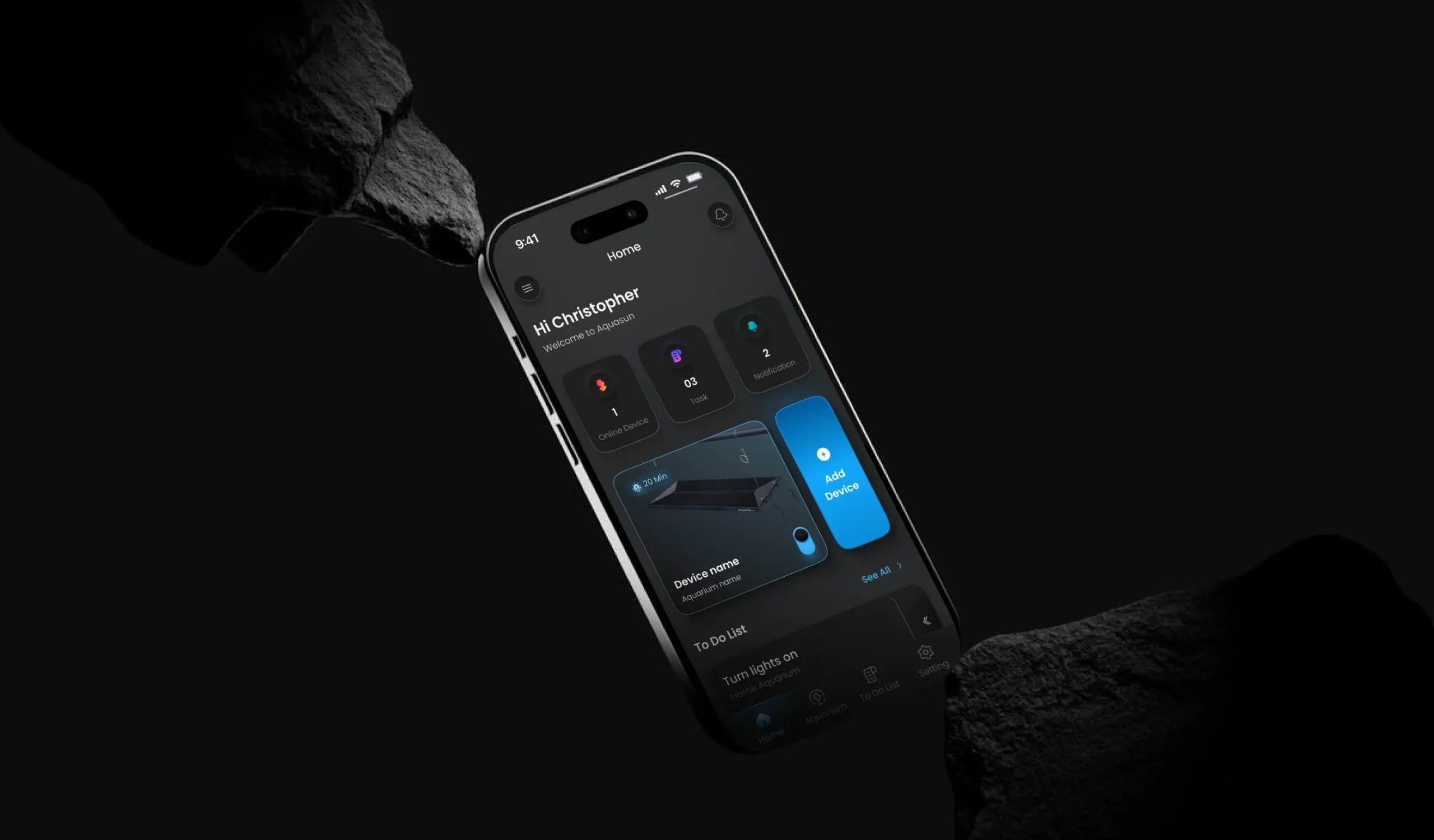
AquaSun Hero Section Image

Project Overview

Aqua Sun is a connected aquarium management application designed to bridge the gap between aquarium owners and their physical lighting hardware.

The product allows users to connect compatible aquarium lights to their mobile device and manage their lighting experience remotely — from simple on/off control to RGB/RGBW customization, reusable presets, sunrise and sunset transitions, and short- and long-term schedules.

But lighting control was only one part of the product.

Aqua Sun was designed around a broader ecosystem where users can manage multiple aquariums, multiple connected devices, lighting configurations, schedules, and aquarium maintenance tasks from a single mobile experience.

One of the most important product decisions was defining the relationship between these different entities:

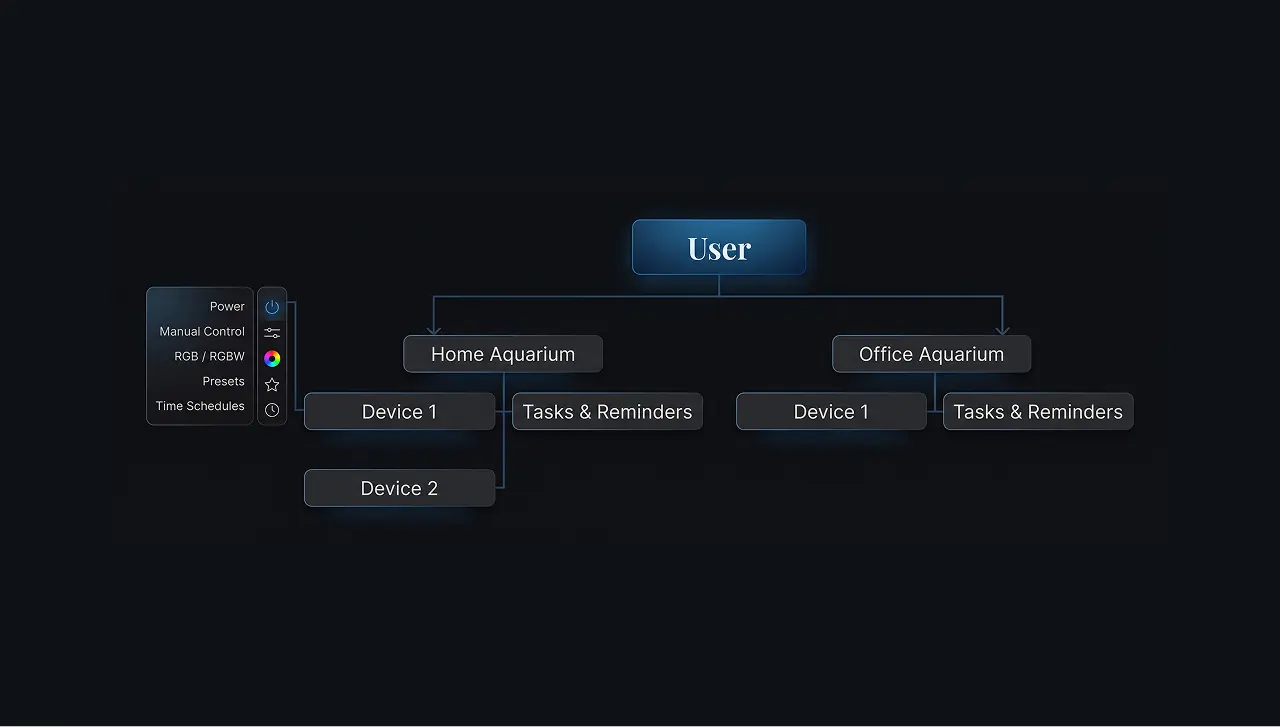
Aquariums own the care and maintenance experience, while Devices own the physical lighting controls.

This distinction became the foundation of the information architecture and influenced navigation, user flows, screen hierarchy, and interaction design throughout the product.

I worked on the product from the ground up — from defining the product structure and information architecture to designing the UX/UI, interaction patterns, and final interfaces for iOS and Android in both Light and Dark modes.

Figma
PS
AI

Project Info

Project Type

Connected IoT mobile application for aquarium management, lighting control, automation, and maintenance.

Category

Mobile App · IoT · Smart Hardware · Aquarium Management

Project Scope

End-to-end product design from product definition and system architecture to final UI.

My Role

Product Designer / UX/UI Designer
Responsible for product structure, information architecture, user flows, interaction design, UI design, lighting control experience, scheduling, aquarium management, and cross-platform interface design.

Platform

iOS & Android

Timeline

3 Month

Define Project

Defining
the Product Architecture

At first glance, Aqua Sun could look like a simple remote control for an aquarium light. But the actual product model was much more complex. A user doesn't necessarily have only one aquarium. An aquarium doesn't necessarily have only one device. And not every action in an aquarium is related to a device.

A user may have:

1. Multiple Aquariums
2. Multiple Devices per Aquarium
3. Different Lighting Configurations per Device
4. Schedules & Automation


while simultaneously managing:
Tasks & Reminders for the Aquarium itself


This created an important product-design question:

How do you create a simple experience around a system that contains multiple physical and digital entities?
The solution started by defining the product model before designing individual screens.

User Journey

The overall experience was designed around four main stages:

01

Create an Aquarium

The user first establishes the environment they want to manage.

Connect the Hardware

A compatible lighting device is added to the selected aquarium.

01

Control & Automate

The user can control the device manually or configure presets and schedules.

Manage Aquarium Care

Tasks and reminders can be created independently at the aquarium level.

The experience was
intentionally designed so that the user
doesn't need to understand the underlying technical architecture of the hardware.

01

Creating the Aquarium

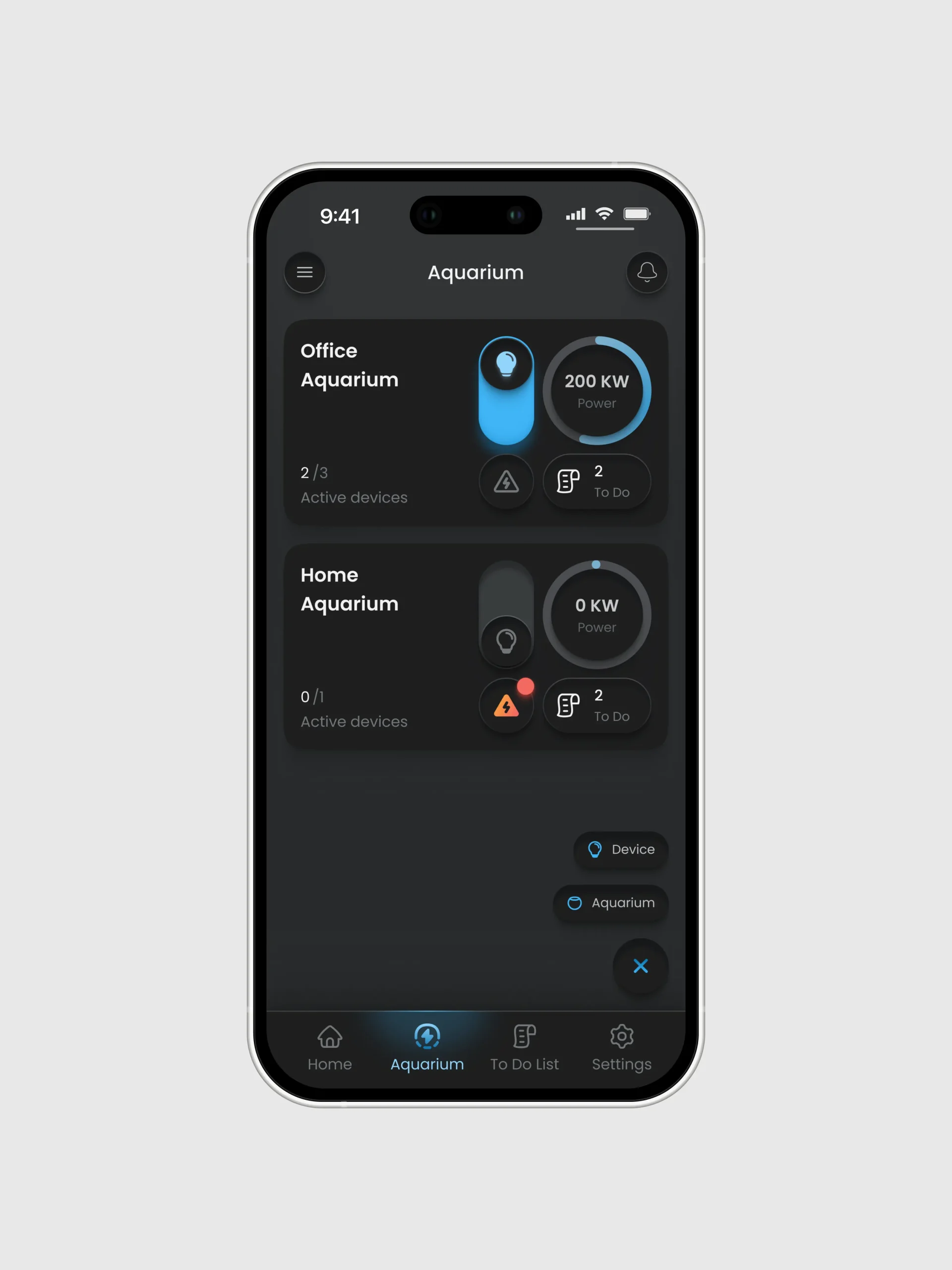
The aquarium is the primary organizational layer of the product.

Users can create multiple aquariums and manage each one independently.

Each aquarium acts as a container for:

1- Connected devices

2- Device status

3- Aquarium-related tasks

4- Maintenance reminders


This makes the aquarium the user's primary mental model rather than the physical light itself.

02

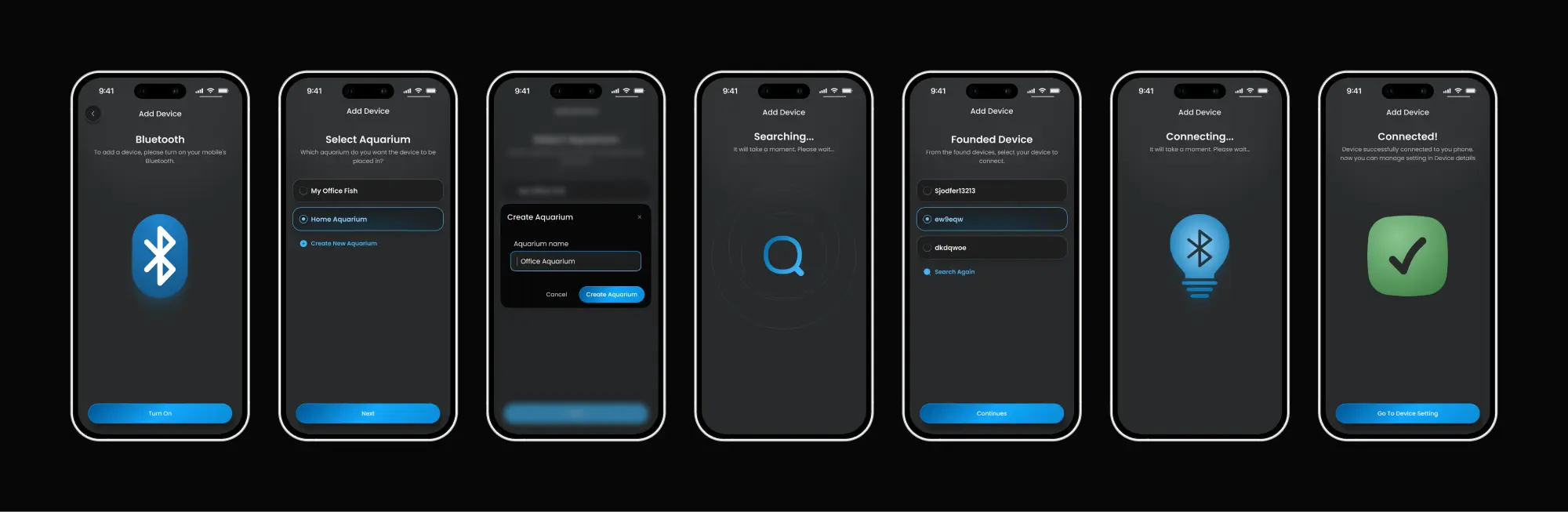
Connecting Devices

Once an aquarium exists, users can add compatible lighting hardware to it. The conceptual flow is:

1- Aquarium

2- Add Device

3- Connect Hardware

4- Device Added

5- Control Device


This relationship is important because one aquarium can contain multiple devices.

Instead of creating a separate experience for every piece of hardware, devices become independent objects inside the aquarium.

03

Controlling the Light

Once connected, users can control their lighting directly from the mobile application.

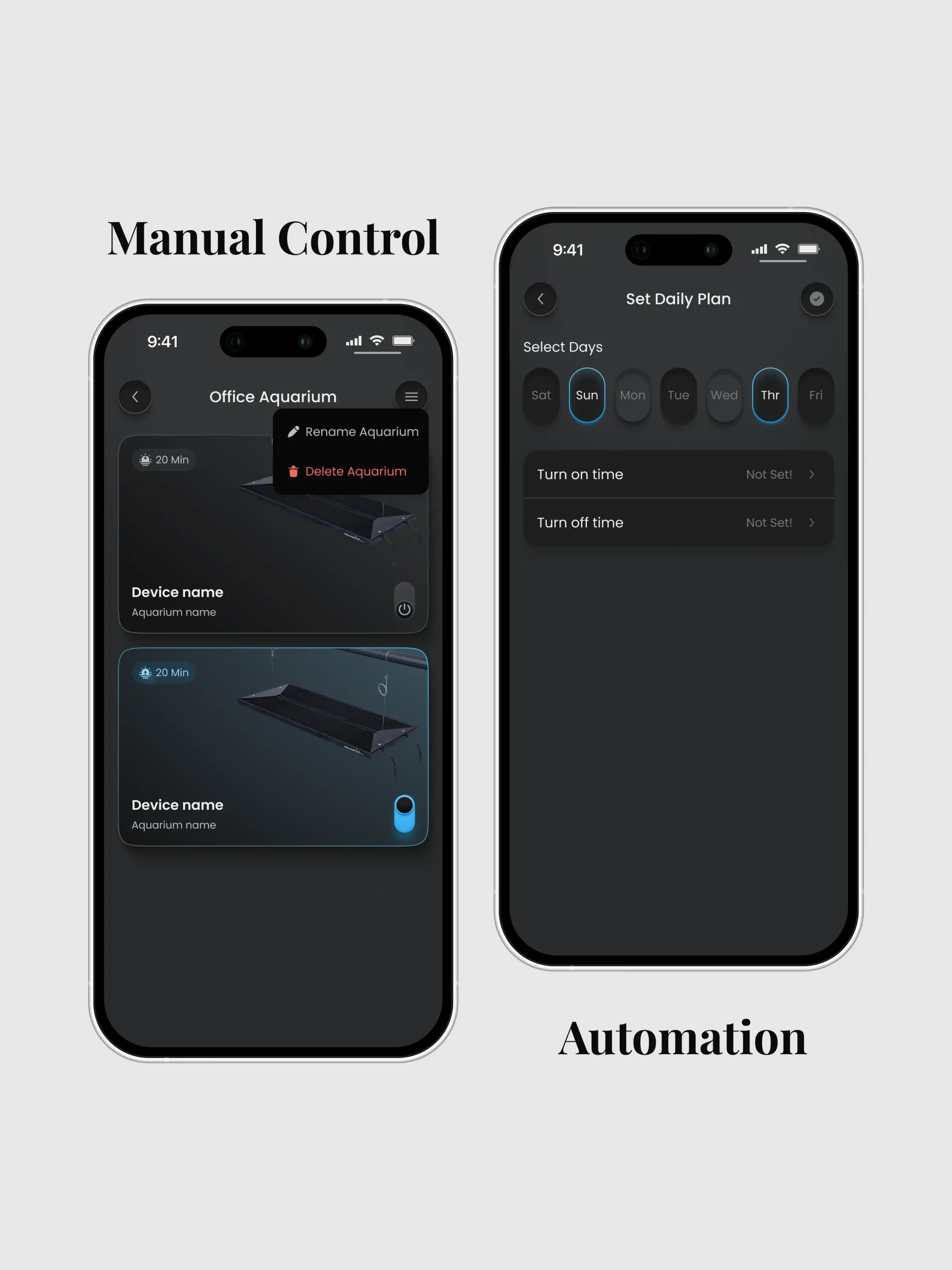
The device experience is divided into two main modes:

Manual

For immediate, direct lighting control.


Time Schedule

For automated lighting behaviour. This distinction allows the same device to support both quick interactions and long-term automation without mixing the two mental models.

04

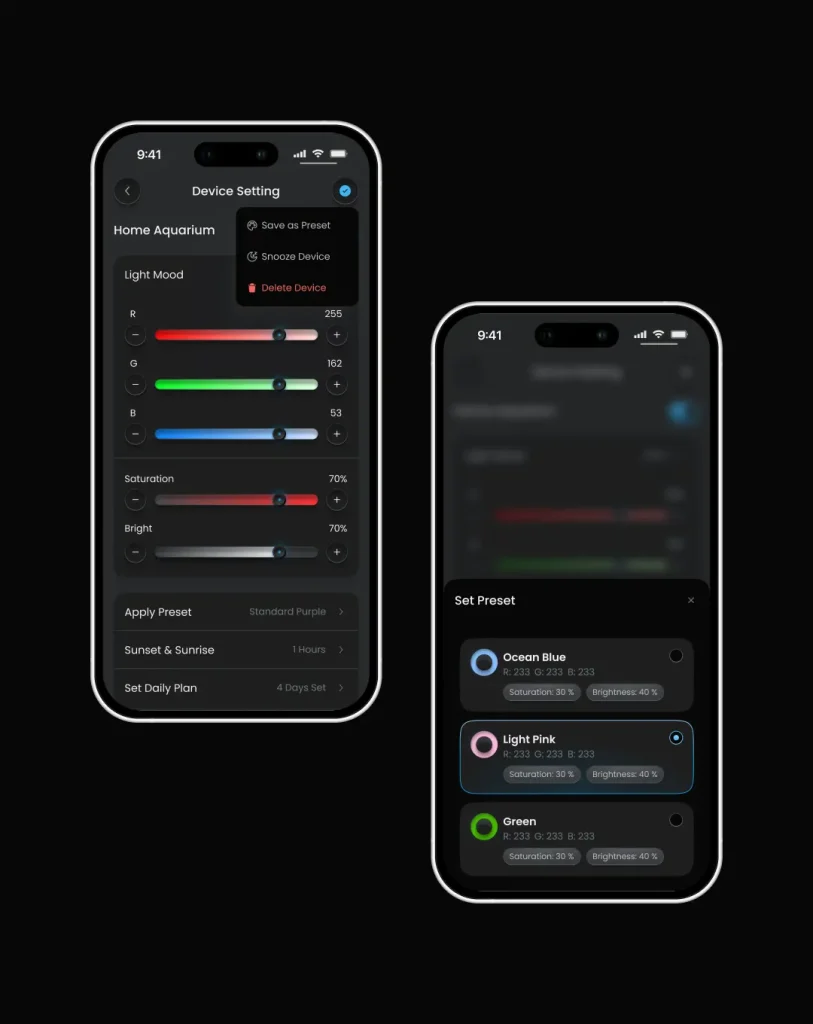
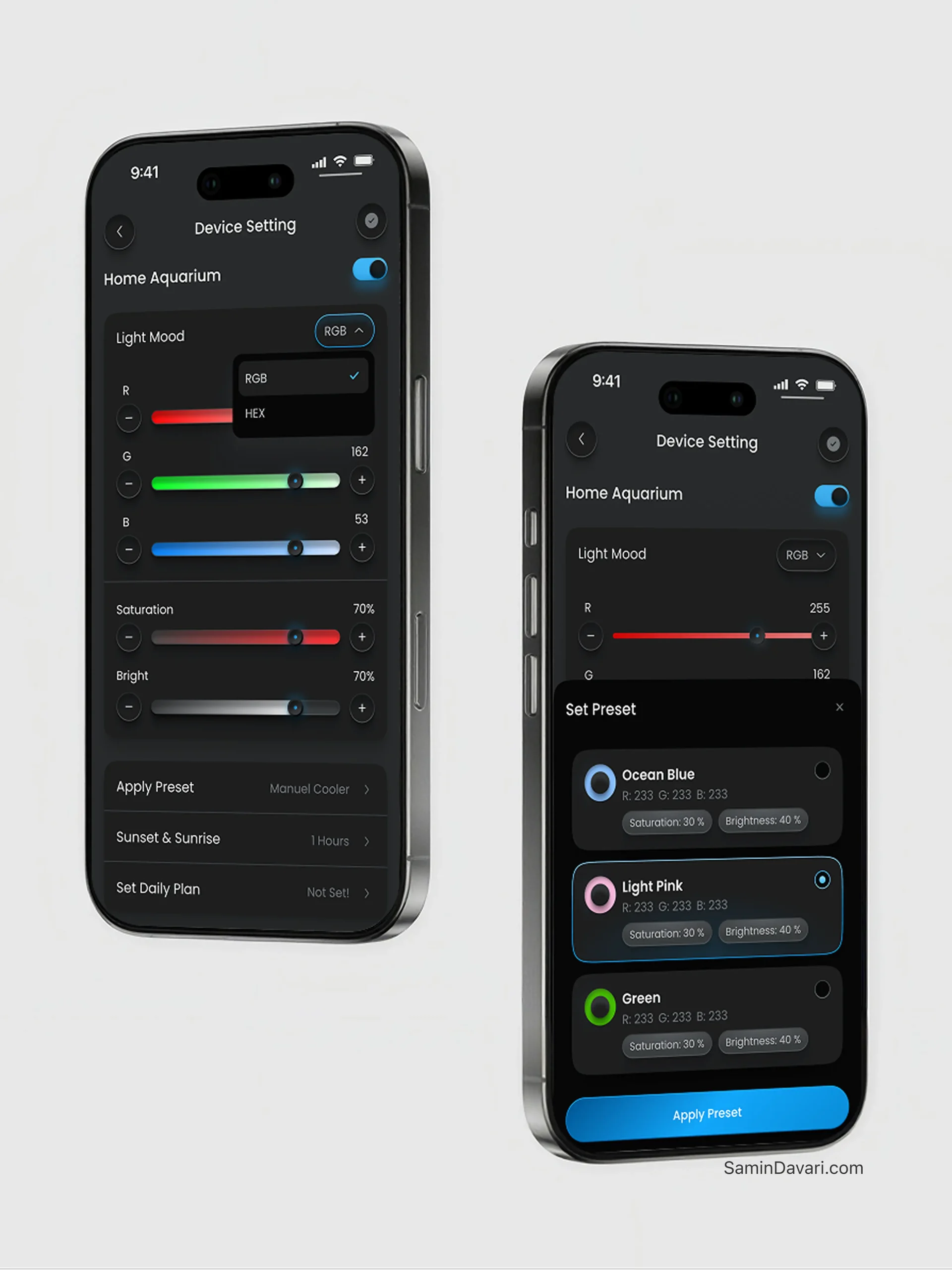
Customizing RGB / RGBW Lighting

Lighting control is one of the core experiences of Aqua Sun.

Users can adjust individual lighting channels and fine-tune their desired configuration.

The experience supports:

. RGB/RGBW adjustment

. Individual channel control

. Direct value editing where applicable

. Immediate lighting changes

. Saving configurations as presets

The design needed to make a technically detailed control system feel understandable and approachable.

05

Presets

Repeatedly creating the same lighting configuration would add unnecessary friction.

Aqua Sun therefore introduces a reusable preset system.

Users can choose from predefined configurations and apply them directly to their device.

The visual design uses color indicators and configuration information to help users distinguish between different lighting presets.


Users can also create their own lighting configuratio

06

Sunrise & Sunset

Lighting doesn't always need to switch between completely off and completely on.

Aqua Sun supports gradual transitions through sunrise and sunset duration settings.

Users can define how long the light should take to gradually brighten or dim.

This feature becomes particularly valuable when combined with scheduled lighting plans.

07

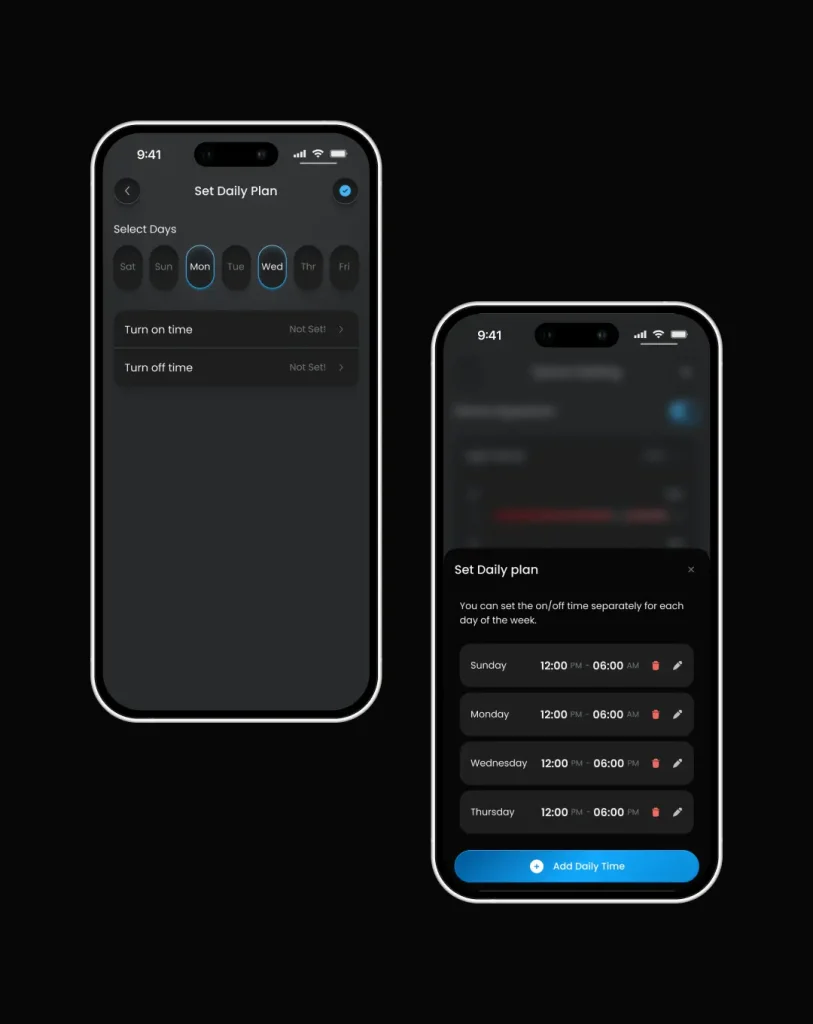
Short- & Long-Term Scheduling

he scheduling experience allows users to move from manual control toward automation.

Rather than repeatedly controlling the light themselves, they can define when the device should operate.

The scheduling system supports recurring plans and weekly configurations.


Users can define different schedules for different days, creating a more flexible lighting routine.

The goal was to make advanced automation available without making it the default complexity of the device experience.

Product Model

Designing One Simple Experience
Around Multiple Systems!

The biggest design challenge wasn't creating a slider, a preset screen, or a schedule screen individually. It was defining how all of these features should work together. Aqua Sun combines several different systems:

Open Application

01

Physical hardware


The connected aquarium light.

02

Digital controls


Power, RGB/RGBW and manual lighting adjustments.

03

Automation


Schedules, weekly plans and sunrise/sunset transitions.

04

Aquarium management


Multiple aquariums and multiple devices.

05

Aquarium care


Tasks and reminders that are independent from the hardware.

Users

Aquarium Owners
The primary users are aquarium owners
who need to manage both their aquarium lighting & recurring maintenance.

image

image

Their needs are not limited to turning a light on or off.
They may need to:

  1.  Manage multiple aquariums
  2. Control multiple devices
  3. Adjust lighting
  4. Create reusable lighting presets
  5. Automate lighting schedules
  6. Create gradual transitions
  7. Remember maintenance activities
  8. Monitor their aquarium-related tasks

The product therefore needed to support both quick actions and long-term management.

Decision

The Key Product Decision
Aquarium vs. Device

One of the most important UX decisions was determining where information should live.

Device

A device represents physical hardware.
Therefore, device-specific functionality includes:
- Power
- Manual lighting
- R-GB/RGBW
- Presets
- Custom presets
- Sunrise & Sunset
- Schedules

Aquarium

An aquarium represents the environment being maintained.

Therefore, aquarium-level functionality includes:
- Connected devices
- Aquarium information
- Tasks
- Reminders
- Maintenance activities

Device

A device represents physical hardware.

Therefore, device-specific functionality includes:

- Power
- Manual lighting
- R-GB/RGBW
- Presets
- Custom presets
- Sunrise & Sunset
- Schedules

Aquarium

An aquarium represents the environment being maintained. 
Therefore, aquarium-level functionality includes:

- Connected devices
- Aquarium information
- Tasks
- Reminders
- Maintenance activities

This principle became one of the foundations of the product architecture.This created a simple principle:

 
Control the hardware at the device level. Manage the aquarium at the aquarium level.
My Role

I worked on Aqua Sun
as a Product / UX/UI Designer,
approaching the product from the system level rather than starting from individual screens.

The process started with understanding:
- What the physical hardware does
- What the mobile application needs to control
- How users organize aquariums
- How multiple devices relate to one aquarium
- Which actions belong to a device
- Which activities belong to an aquarium
- How manual control transitions into automation

From there, I translated the product requirements into a structured information architecture and a set of user flows before moving into detailed UI design.

Scope

What I Owned End-to-End

01

Product & System Definition

I helped define the product structure and the relationships between users, aquariums, devices, lighting controls, schedules, and tasks. The goal was to create a scalable model that could support multiple aquariums and multiple devices.

01

Information Architecture

I structured the application around two main levels:
Aquarium-level management and Device-level control
This became the foundation for navigation and content hierarchy throughout the application.

01

User Flows

I designed the core journeys for:
Account entry/ Aquarium creation/ Device connection/ Device control/ RGB/RGBW adjustment/ Preset selection/ Custom preset creation/ Scheduling/ Sunrise & sunset configuration/ Aquarium task creation/ Reminder management

01

Lighting Control Experience

I designed the interaction model for controlling the physical lighting hardware, including:
On / Off/ Manual mode/ RGB/RGBW control/ Channel adjustments/ Presets/ Custom presets

01

Automation & Scheduling

I designed the scheduling experience from simple time-based control to more detailed weekly plans.
This included:
Time schedules/ Daily plans/ Weekly schedules/ Sunrise/ Sunset/ Transition duration/ Schedule editing/

01

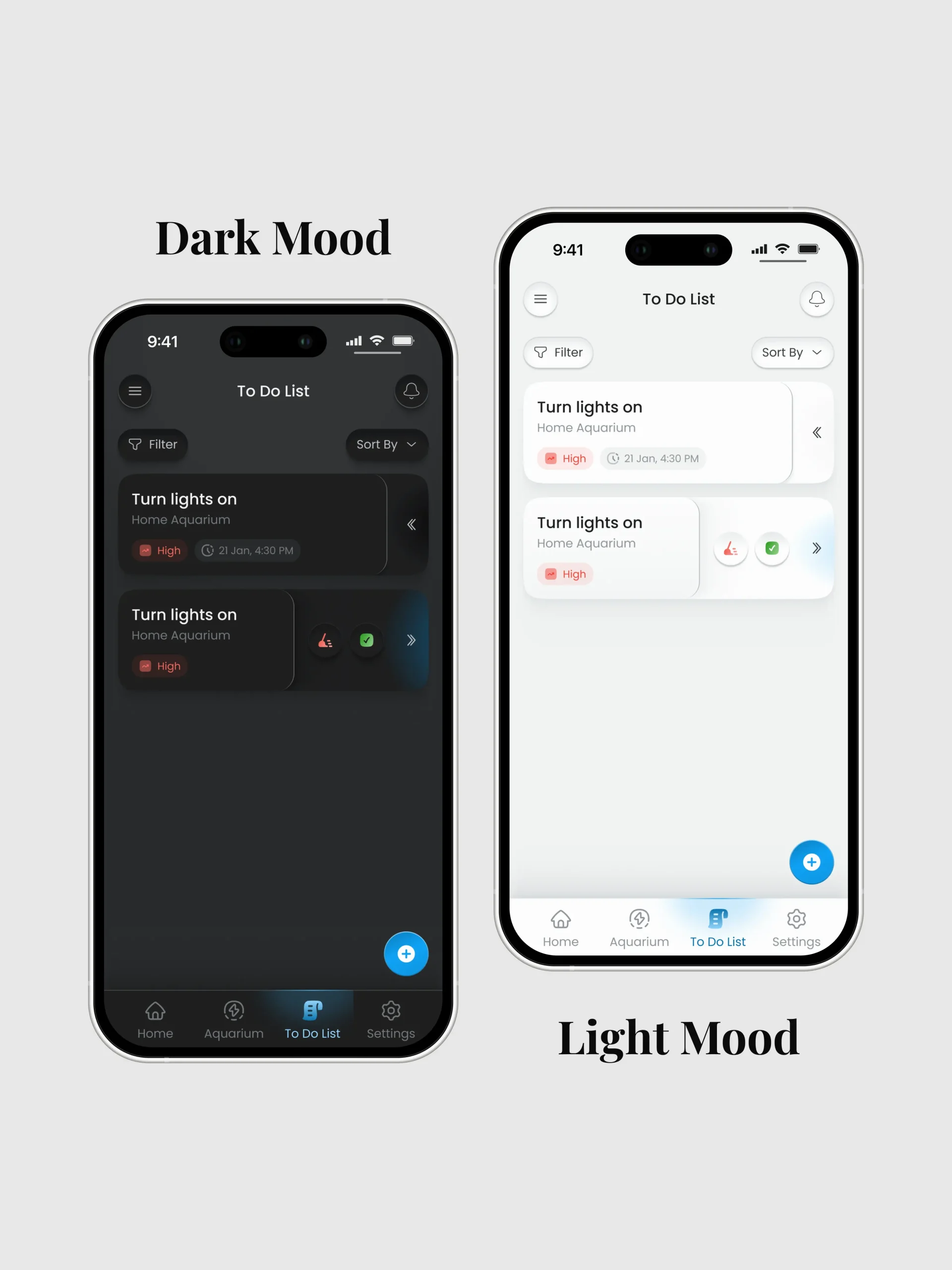
Aquarium Tasks & Reminders

I designed the task experience around the aquarium rather than individual devices.
Tasks can contain information such as:
Title / Description / Priority / Date / Time / Reminder / notification settings

01

Light & Dark Mode

The complete experience was designed in both Light and Dark themes.
The system needed to maintain hierarchy and readability across both themes.

Outcomes

From a Lighting Controller to a Connected Aquarium Ecosystem

The core outcome of Aqua Sun was not simply a more convenient way to control a light. It was the creation of a scalable product model connecting:
USER / AQUARIUM / DEVICES / LIGHTING / AUTOMATION
independent from the hardware. This architecture allowed the product to grow from a simple connected-lighting experience into a broader aquarium management ecosystem. The final experience brings together physical hardware, mobile control, lighting customization, automation, aquarium organization and maintenance in one product.

If you're reading this as a hiring manager or reviewer

The thing I'd want you to take from this case study isn't a specific screen — it's the discipline of going one level beneath the interface before designing it, and being willing to say where that discipline still fell short. Happy to walk through any of the flows above in more depth, including the parts I didn't get fully right.