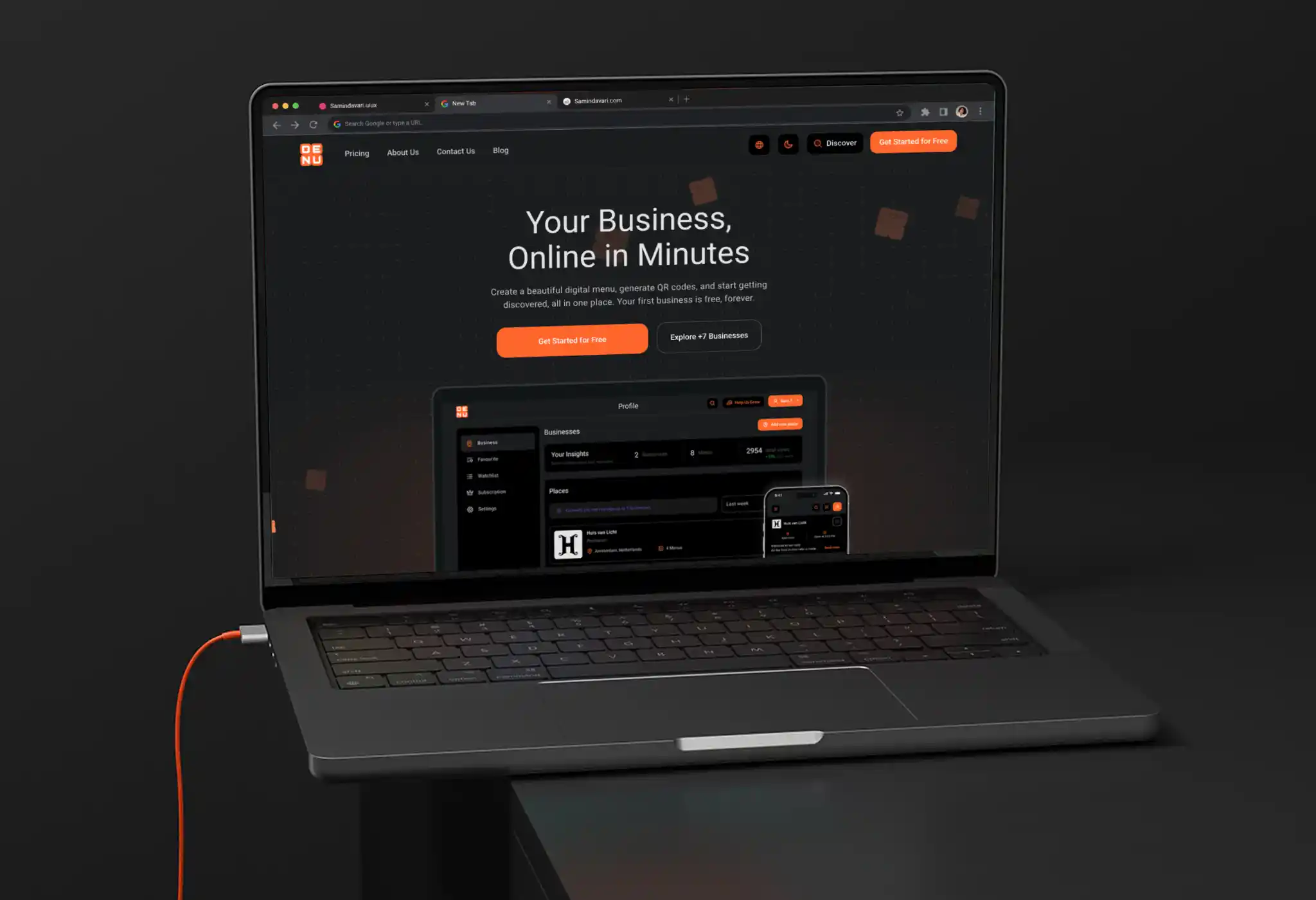
Denu
Multi-Industry Digital Menu & Merchant Management Platform
Project Overview
DENU is an all-in-one SaaS platform empowering physical businesses—ranging from restaurants and cafes to spas and retail shops—to create, organize, and publish dynamic digital menus accessed instantly via QR codes. While end customers experience a responsive digital web catalog, the core design challenge lived inside the Merchant Dashboard: building an adaptable, deeply nested Information Architecture (IA) capable of handling multi-language localization (supporting simultaneous LTR and RTL scripts), diverse pricing models, and rich dietary taxonomy without causing cognitive overload for merchants.
Project Info
Project Type
B2B2C Digital Menu Infrastructure & Catalog Management Platform
Category
Responsive Web App (Merchant Dashboard & Public-Facing Dynamic Menu)
My Role
Product Designer (User Journey Mapping, Information Architecture, Component Systems, Responsive UI)
Timeline
8 Months
Problem Statement
& Design Goals
Merchant management dashboards often struggle with complex, multi-layered data entry. Merchants find it tedious to update multi-lingual menus, configure item variants (sizes, pricing tiers, tax rates), and apply item attributes across cluttered user interfaces.
Primary Objective:
Deliver a frictionless, guided workflow from initial business onboarding to fine-grained item customization.
Target Audience:
Business owners, venue managers, and operators seeking a fast, self-serve digital menu control center.
The challenge was not simply to create a menu builder, but to model a scalable content system behind it.
A business could contain multiple menus, each menu could contain multiple categories, and each category could contain multiple items with their own pricing, ingredients, and attributes.
Instead of exposing this entire data structure at once, the interface progressively revealed complexity as merchants moved deeper into the hierarchy.
This approach helped preserve context while keeping each task focused on the level the merchant was currently managing.
Managing Deep Nested Hierarchy
(Parent-Child Architecture)
The Challenge
DENU's hierarchical model introduced complexity at multiple levels: merchants had to move from a business profile into menus, categories, and finally detailed menu items with pricing and taxonomy.
The deeper the merchant moved into the hierarchy, the more important it became to preserve context and make the next available action obvious.
In deeply nested software systems, navigating 4 to 5 layers deep introduces two major UX risks:
Business Profile (Place)
Menus
Categories
Menu Item
Item Attributes
DENU Information &
User Flow Architecture
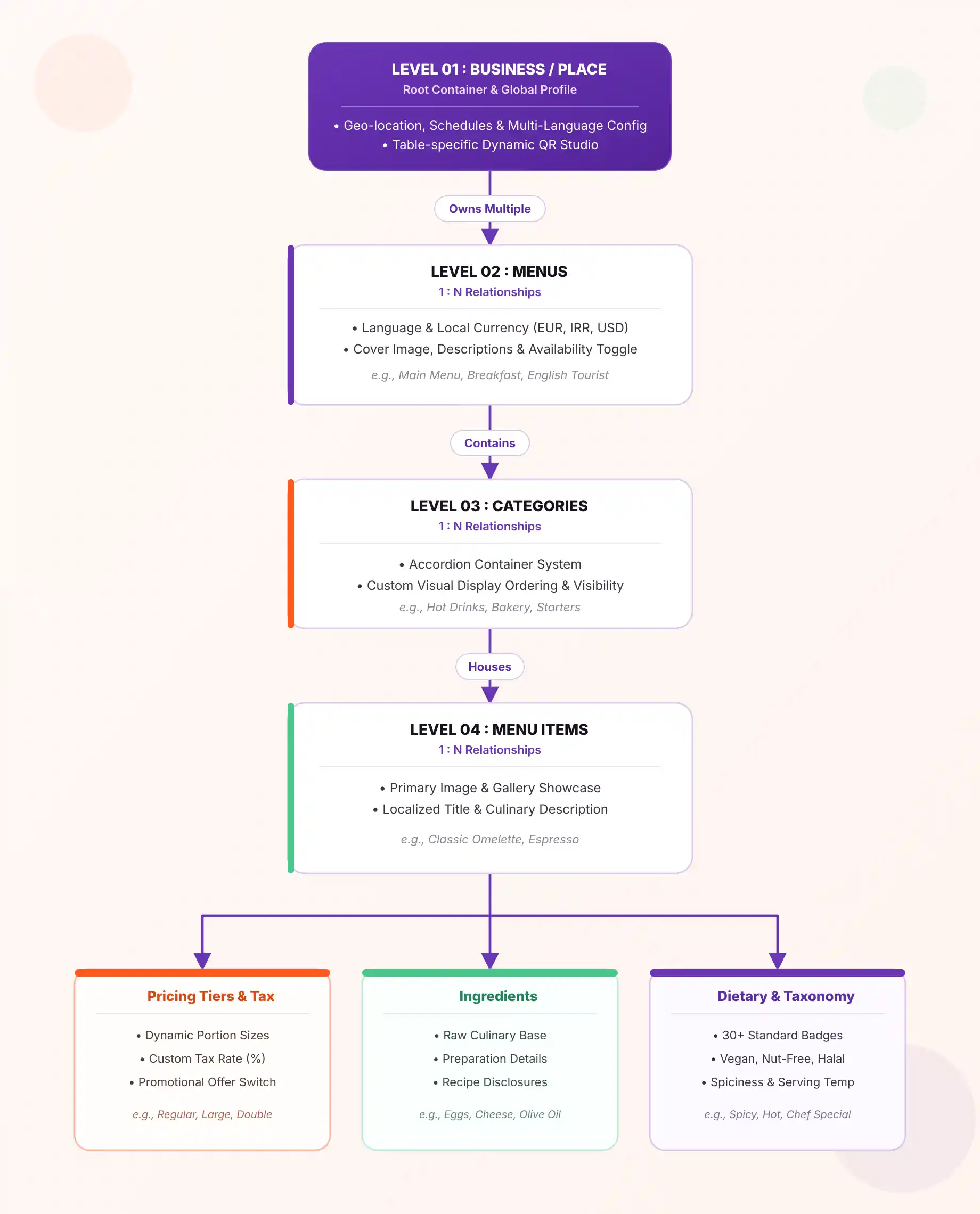
DENU was structured around a four-level content hierarchy, where each level builds on the data created at the previous level:
Business / Place
Business profile, location, business type, localization, brand identity, customer touchpoints, and operating schedule.
Menus
Language, currency, menu details, cover image, availability, duplication, and QR configuration.
Categories
Category creation, hierarchical organization, accordion-based structure, and empty/active states.
Items & Taxonomy
Item information, image gallery, multi-tier pricing, tax configuration, ingredients, dietary attributes, and promotional taxonomy.
Two Major Risks
for User Experience
In deeply nested software systems,
navigating 4 to 5 layers deep introduces two major UX risks:
1- Context Loss:
Merchants forget which category or menu the item they are currently editing belongs to.
2- Empty-State Friction:
When entering a newly created container (e.g., an empty menu or an empty category), merchants experience ambiguity regarding the next required action.
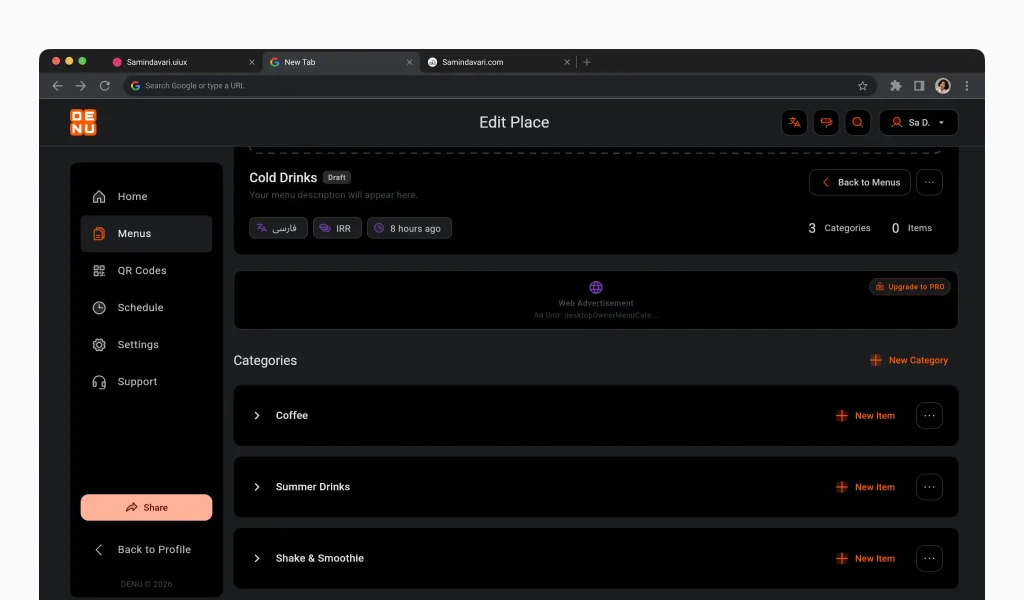
Single-Page Accordion Layouts:
On the category management screen, all categories within a menu are rendered on a unified page using expandable/collapsible accordions. Merchants can review the entire menu structure at a glance without navigating across multiple pages.
Actionable Guided Empty States:
Every empty stage in the hierarchy features a distinct DENU brand mascot accompanied by explicit Call-To-Action (CTA) triggers:
- No Business Added: "No Place Added Yet" with an Add Place button.
- No Menu Created: "No menus created yet!" with a + New Menu button.
- Empty Menu: "This menu is currently empty!" with an + Add your first category button.
- Empty Category: "No items in this category yet!" with a + New Item button inside that specific accordion panel.
Non-Disruptive Isolated Modals:
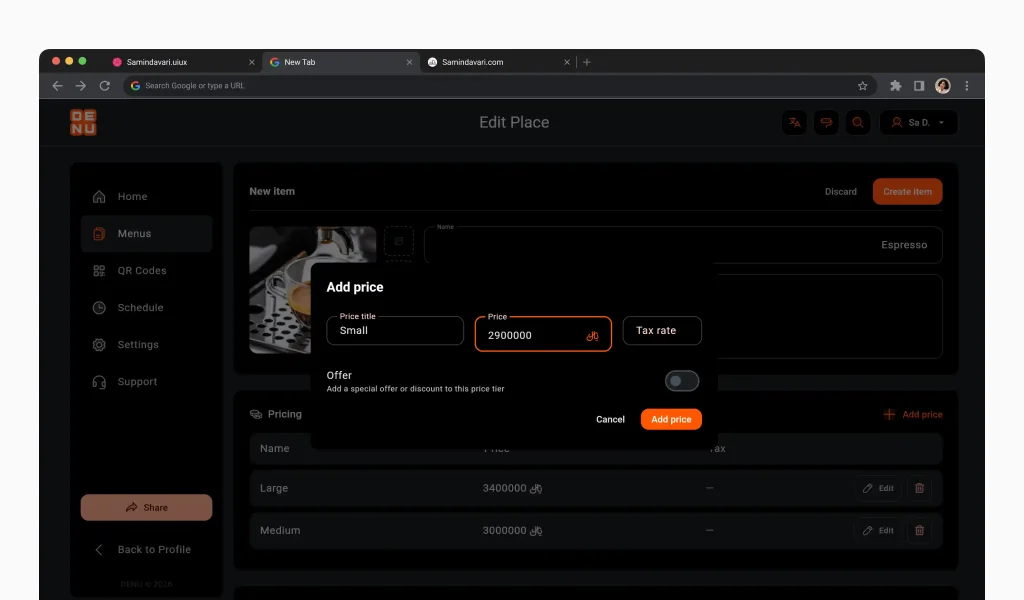
Secondary operations (such as creating a menu, defining a new category, or adding pricing tiers) are handled within focused modal overlays, preserving background context and reducing visual switching.
This hierarchy allowed the same underlying structure to support different types of physical businesses while keeping each level focused on a manageable set of tasks.
From Architecture to User Flows
The four-level architecture defined the structure of the product, while the following flows defined how merchants progressively created and managed that structure.
The experience was designed as a continuous journey:
Business Setup
Control Center
Menu Setup
Category & Item Management
Step-by-Step User Flows
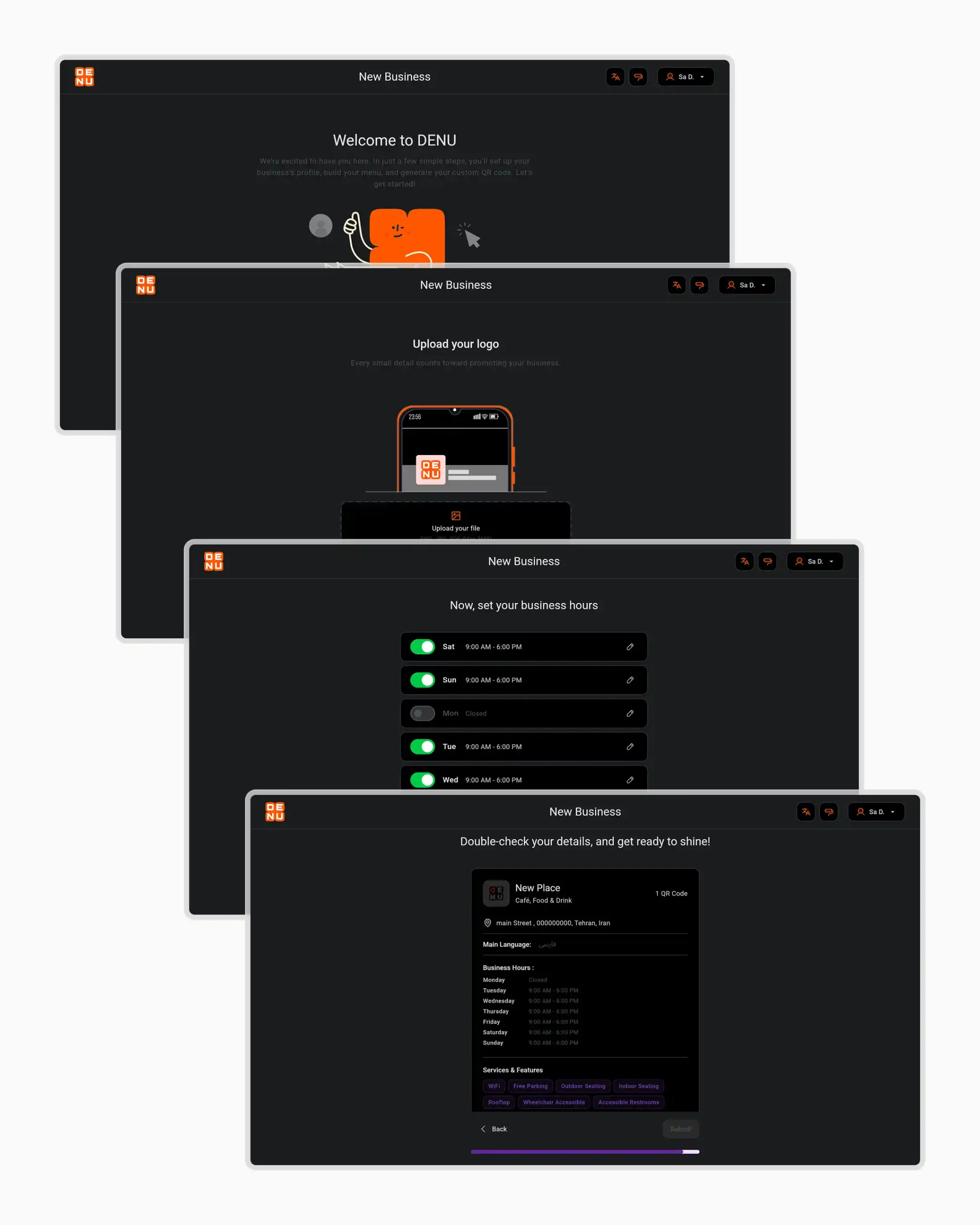
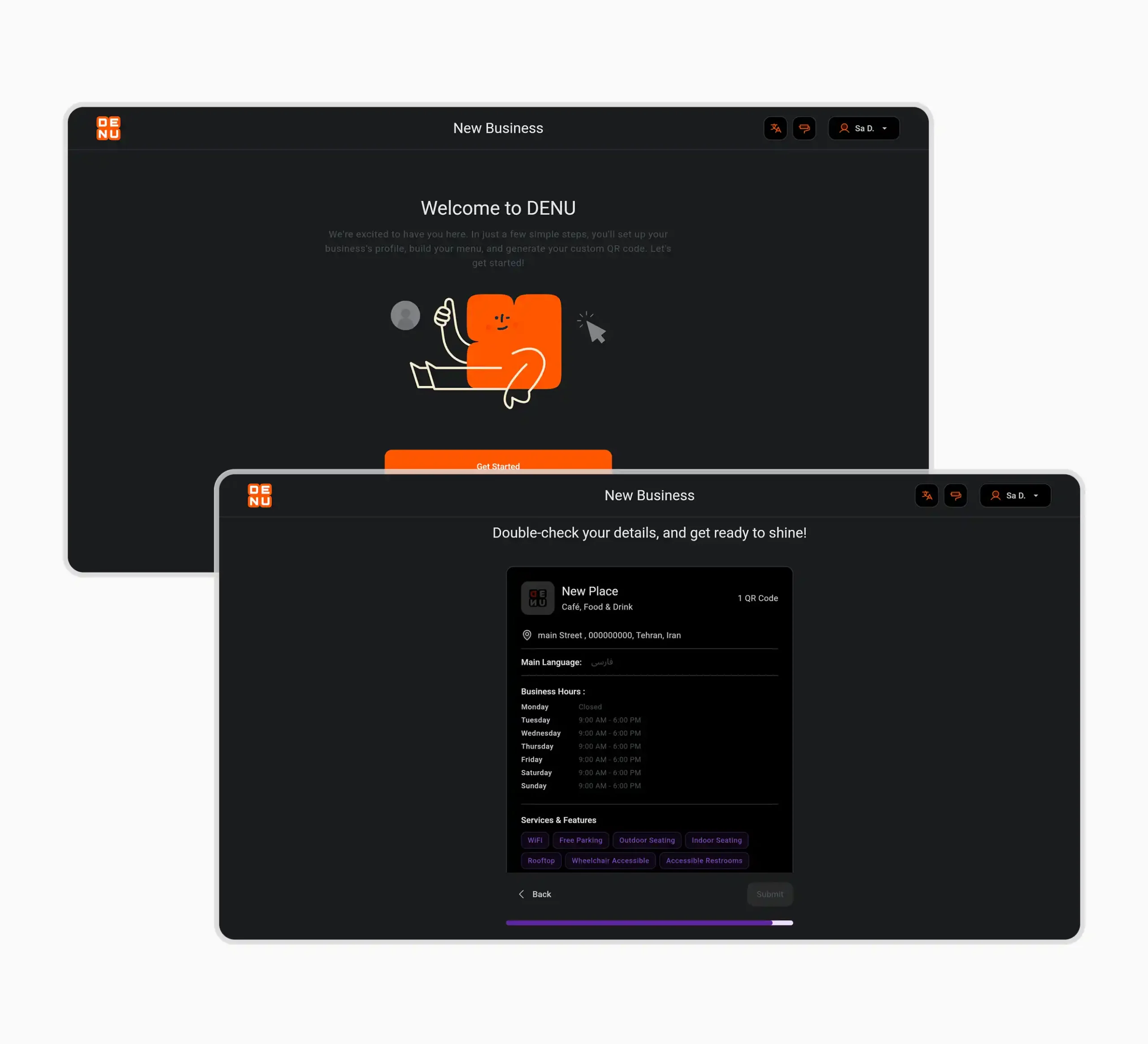
Business Onboarding Wizard (Create New Business)
A multi-step onboarding flow designed to distribute setup effort into manageable micro-tasks:
1- Empty State Entry: Displays the Add Place prompt on an empty dashboard.
2- Welcome Screen: "Welcome to DENU" landing step with a Start trigger.
3- Location Setup: Country, State/Province, City, and Area/District selector.
4- Business Classification: Selection of primary domain (e.g., Food & Drink) and refined business type (e.g., Cafe, Restaurant, Fast Food, Spa, Flower Shop, Food Truck).
5- Menu Localization: Selecting supported languages (English, Persian, Arabic, Turkish, Russian, Spanish, German, French, Italian, Chinese).
6- Identity & Customer Touchpoints: Business name input, logo upload with live mobile frame preview, customer engagement channels (ordering, table booking, event reservation, phone, WhatsApp, Instagram), and service capacity (table/counter count).
7- Social Channels & Operating Schedule: Social media profile links (Instagram, Facebook, Telegram, WhatsApp) and weekly working hours schedule (Saturday through Friday) with toggle switches and opening/closing time pickers.
8- Review & Confirm: A summary card displaying all entered details for final verification before launching the merchant dashboard ("Your place is ready!").
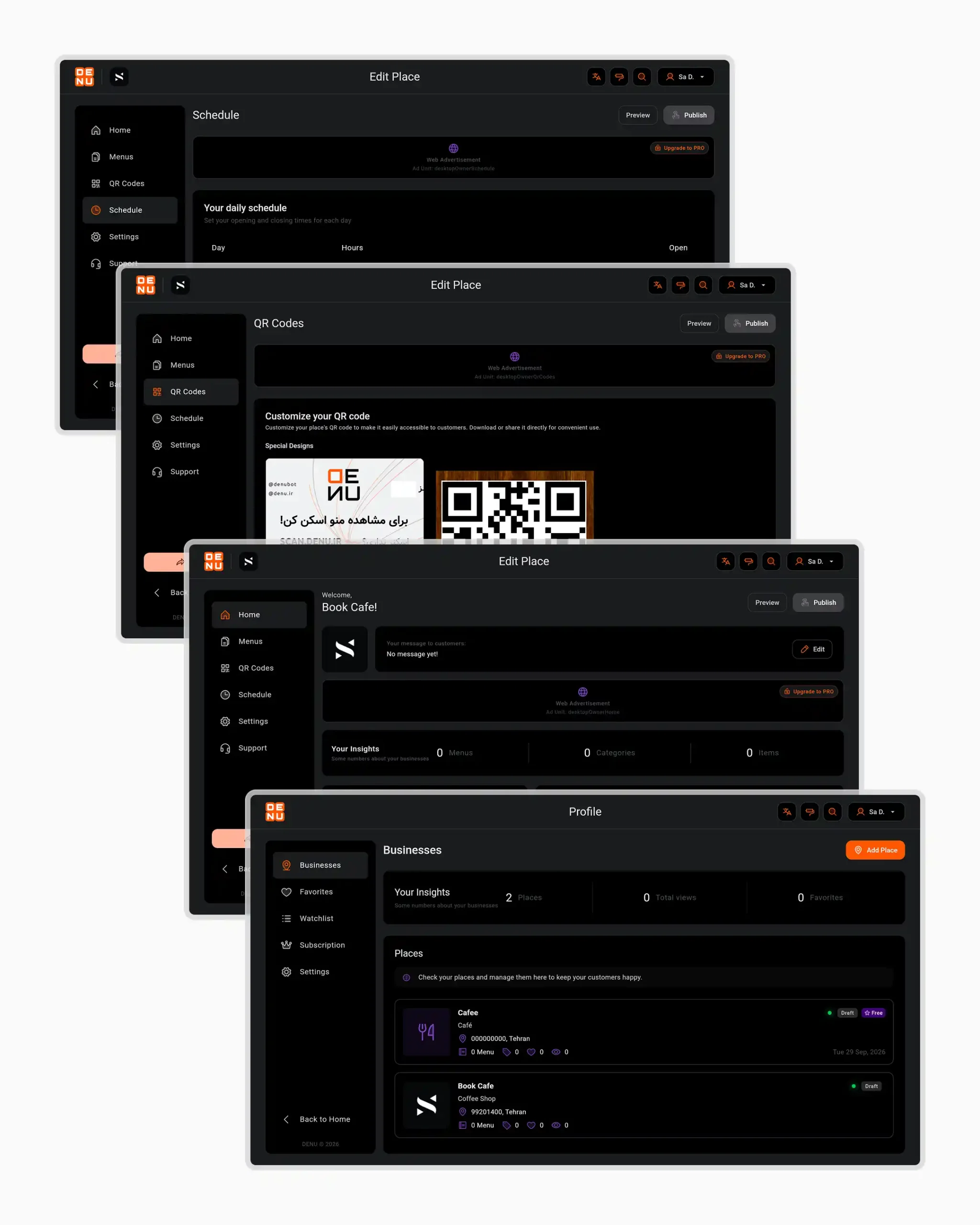
Central Control Center (Business Dashboard & Place Management)
The merchant's primary operational hub:
1- Places Overview: Overview cards for registered venues with status badges (Draft / Public) and a "Your Insights" summary (total places, views, favorites).
2- Edit Place Home: Custom welcome message editor for customers, menu metrics breakdown, recent submitted menus, and a 7-day visitor analytics chart.
3- QR Codes Customization: Downloadable QR codes with thematic background templates (e.g., wooden, cartoon, corporate) and customizable Call-to-Action text (e.g., "SCAN DENU.IR").
4- Schedule & Settings: Daily operating schedule management, primary system language configuration (e.g., Persian/Farsi), custom menu link slug management (e.g., https://denu.app/IP_WY2n), and Brand Sub-type designation.
The Control Center as an Operational Layer
The Control Center sits outside the content hierarchy as the merchant's operational hub.
While the four-level architecture defines how content is structured, the Control Center provides access to cross-cutting operations such as place management, insights, QR customization, schedules, settings, and menu status.
This separation kept content creation and day-to-day business operations within the same system without mixing their responsibilities.
Menu Framework Setup (Create Menu Flow)
Structuring and organizing catalogs:
1- Add Menu Modal: Select menu language, base currency (e.g., IRR, USD), menu title (e.g., "Cold Drinks"), and description.
2- Menu Management Table: Displays all created menus with name, language, item counts, active availability toggle, and context actions (Edit, Duplicate, Delete).
3- Menu Details Screen: Cover photo uploader (supporting PNG, JPG, PDF up to 5MB), draft/live status indicators, currency/language tags, and category/item counters.
4- First Category Creation: Guided empty state prompting "+ Add your first category" leading to the category creation modal (Name & Description).
Category Management & Rich Item Setup
The core data input workflow for menu items:
1- Category Accordion View: Interactive list of created categories (e.g., No Alcohol, Breakfast, Cakes) with inline New Category and + New Item buttons.
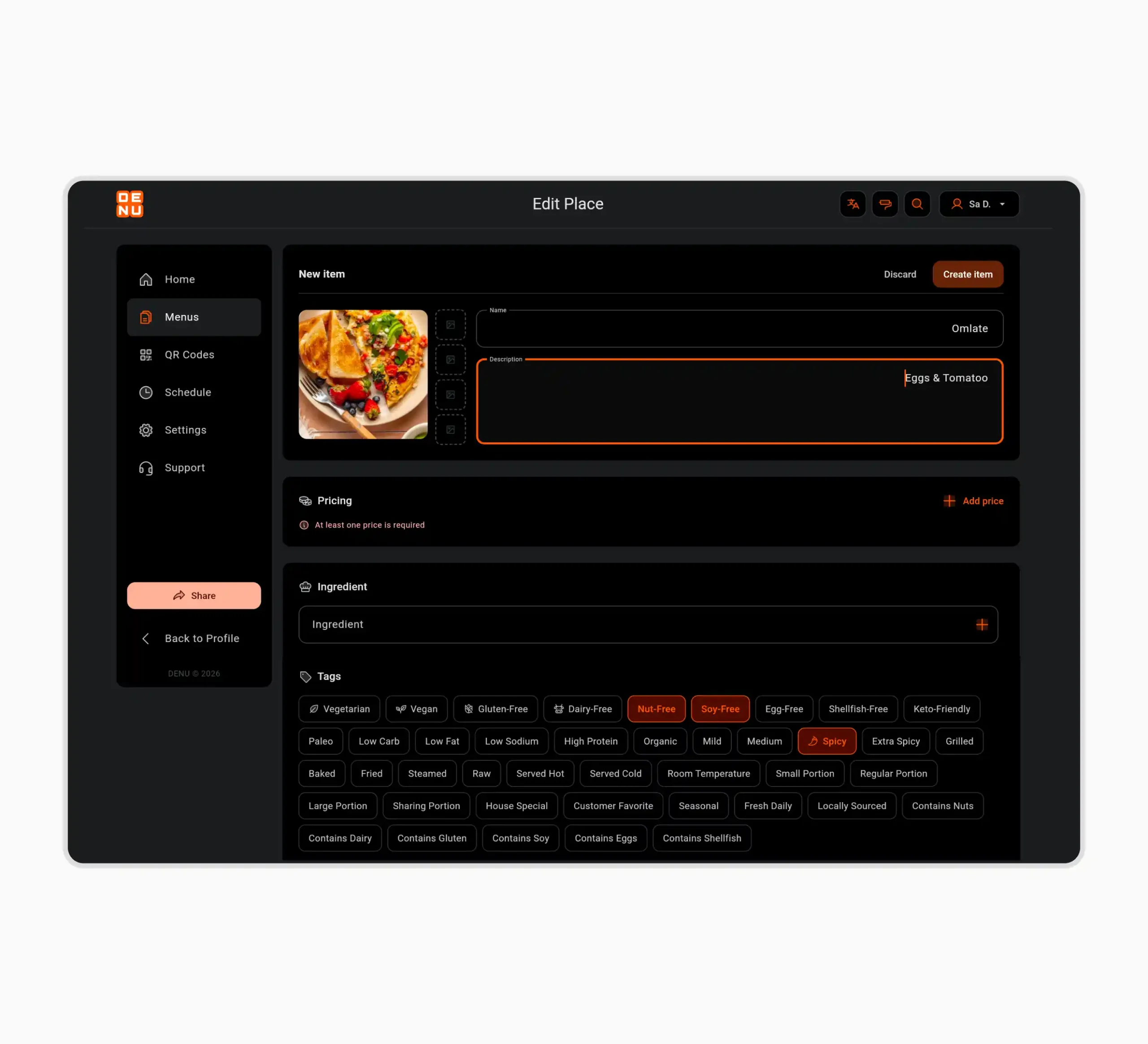
2- New Item Form: Upload main image and additional gallery photos, input Item Name (e.g., "Omlate") and Description (e.g., "Eggs & Tomatoo").
3- Pricing Tiers Modal: "+ Add price" modal supporting custom tier titles (e.g., "Medium Size"), price amounts (e.g., 4,000,000 IRR), tax rate percentages (e.g., 2%), and a promotional Offer toggle for discounts.
4- Ingredients & Comprehensive Taxonomy:
. Ingredients
. Dietary & Allergen Tags
. Temperature & Flavor Tags
. Portion & Cooking Method
. Promotional Tags
Managing Item Complexity Without Interface Overload
A menu item was treated as a structured data object rather than a simple product card.
Basic information, pricing, ingredients, and advanced attributes were separated into focused input groups so merchants could progressively complete an item without being confronted with every available field at once.
This structure made the same item model flexible enough to support different business types while keeping the interaction manageable.
UI System & Design Highlights
Key Outcomes & Value
By structuring the DENU platform around this guided, nested architecture:
1- Business onboarding was broken into focused micro-steps, making a complex setup process easier to navigate.
2- Merchants could manage multi-language and multi-currency menus from a centralized dashboard.
3- Multi-tier pricing and structured attribute taxonomy allowed the same content model to support different physical business types.
4- Guided empty states and contextual actions made the next step explicit throughout the content hierarchy.